How to Tell If an Image Is AI-Generated: The Kim Jong-un Statue
A picture went viral showing Kim Jong-un at the unveiling of his own statue. It looked plausible. It was not real. Here is how the fact-checking organization Teyit proved it, and how you can tell if an image is AI-generated yourself.
What was the claim?
Social media users shared an image they said showed the North Korean leader at the opening of a statue of himself. Teyit, a Turkish fact-checking organization, investigated and rated the claim false. Its verdict: the image was produced with AI tools.
The case is a useful template because the image was not obviously fake. It took several independent checks to settle it.
How did a fact-checker prove the image was fake?
According to Teyit, four checks pointed the same way:
Compare with press coverage
International media reported the first known statue of the leader in March 2026. The statue in the viral image did not match it.
Trace the first post
A reverse image search showed the image first appeared on X on November 7, 2026.
Run an AI detector
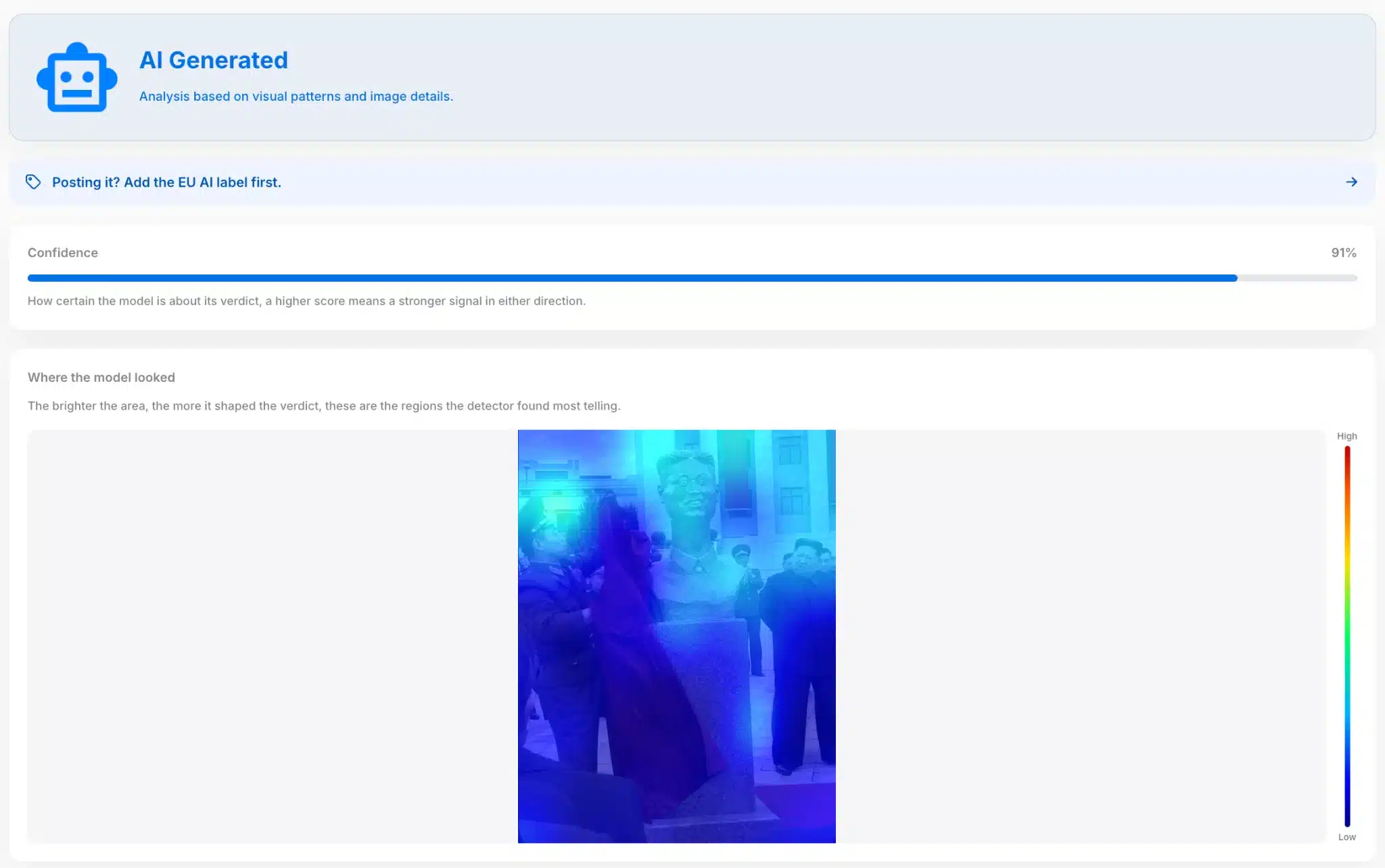
UncovAI estimated a 91% probability that the image was generated with AI tools.
Check watermark tools
A SynthID check, which identifies images made with OpenAI tools, indicated the image came from them. Searches in Korean found no credible source for it.
Our AI image detection supplied one of those four signals. The other three came from careful journalism.
91% is a probability, not a verdict. The case was closed by the combination of checks, not by one score.
How to tell if an image is AI-generated, step by step
You can follow the same logic on any suspicious image:
1. Find the earliest appearance. Use reverse image search. A striking image with no source before a recent post is a warning sign.
2. Compare it with trusted coverage. If the event is real, reputable outlets will usually show it. If they show something different, trust them.
3. Run a detector. Read the result as a probability. A high score is a strong lead, not a final answer. A browser tool like our AI detector extension lets you check images as you browse.
4. Look for watermarks or provenance. Some AI tools embed signals that a verification tool can read. Their absence proves nothing.
5. Search in the local language. Teyit searched in Korean and found no credible source. Local-language searches often surface what English ones miss.
Why fact-checkers combine detection with other checks
No detector is perfect, and heavily edited or compressed images are harder to classify. Detection is fast and scalable, which makes it a strong first filter. Source tracing and provenance then turn a probability into a defensible conclusion.
That is the workflow we see across newsrooms and verification teams, and the reason we build for it. See who uses UncovAI, or read our checklist for verifying a viral video for the video equivalent of this process.
Credit where it is due: this case is Teyit’s work. We are glad our detector helped.
Frequently asked questions
How can you tell if an image is AI-generated?
No single sign proves it. Trace the image to its earliest appearance, compare it with trusted coverage, run an AI detector and read the result as a probability, check for watermark or provenance tools, and search for credible sources in the relevant language.
Was the image of Kim Jong-un at his statue unveiling real?
No. According to Teyit, the image was AI-generated. It did not match press coverage of the statue, it first appeared on X on November 7, 2026, and no credible source for it could be found.
What does a 91% AI probability mean?
It means the detector estimates a 91% likelihood that the image was produced with AI tools. It is a probability, not a proof, which is why fact-checkers combine it with other checks.
Can an AI image detector be wrong?
Yes. No detector is perfect, and edited or compressed images can be harder to classify. We recommend pairing detection with source tracing and provenance checks.
Check an image in seconds
Found a suspicious image? Upload it to UncovAI and get a result with a probability you can act on.
Try UncovAI on an image →