
Is Your WhatsApp Safe? How to Spot Dark AI Scams
Standard antivirus software was built for a different threat. It compares incoming content against a database of known attacks and Dark AI scams are specifically designed to have no prior record. Here's how forensic detection changes that equation, and how to put it to work directly inside WhatsApp.
Why Blacklists Fail Against Dark AI
Every conventional security tool your phone's built-in warnings, Norton Genie, Meta's alerts works from a list. If a malicious link or message has been flagged before, the tool catches it. If it hasn't, it passes through clean.
Dark AI tools like FraudGPT break this model by design. They generate scam content that has never existed before: unique phishing pages, freshly cloned voices, synthetic personas with months of conversation history built up to establish trust. There's nothing to match against a blacklist because the attack was created minutes ago.
Blacklists catch yesterday's scams. Dark AI generates today's and no two are identical.
Forensic Statistical Analysis works differently. Instead of matching against known threats, it examines the structure of the content itself linguistic patterns, URL entropy, character encoding, hostname construction — and flags statistical anomalies that indicate synthetic or malicious origin. It doesn't need to have seen the scam before.
Three Threats the Bot Neutralizes
Catfishing & Social Engineering
Generative AI can now maintain a convincing persona across weeks of conversation building trust, mirroring your language, and steering toward a financial or personal ask. The UncovAI bot analyzes the linguistic patterns of a message thread and flags signals consistent with machine-generated relationship building.
Homograph Attacks
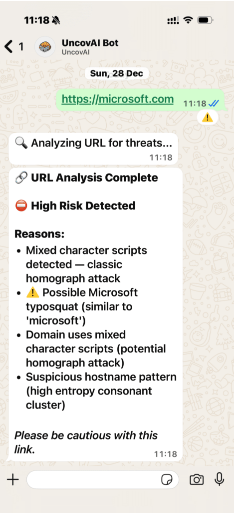
A homograph attack replaces characters in a domain with visually identical equivalents from other scripts swapping a Latin a for a Greek α, for example. The resulting URL looks identical to the real one but routes to a fake site. UncovAI performs a forensic script audit on every domain, catching look-alike substitutions that the human eye misses entirely.
Dark AI Phishing Pages
FraudGPT and similar tools can generate pixel-perfect replicas of bank login pages in minutes. Forward the suspicious link to the UncovAI bot and it runs a deep-scan report checking for high-entropy hostname patterns, suspicious consonant clusters, and structural markers that indicate a generated page rather than a legitimate one.
Voice Note Fraud
Cloned audio is one of the fastest-growing vectors in WhatsApp scams a voice note from a "family member" in an emergency, or a "manager" requesting urgent action. Forward any suspicious voice note to the bot for real-time audio analysis that detects synthetic speech signatures invisible to human ears. See how real-time deepfake detection catches cloned voices.
UncovAI vs. Standard Security Bots
The gap between forensic detection and conventional security tools is significant especially for the threat types that are growing fastest in 2026.
| Feature | UncovAI WhatsApp Bot | Standard Bots (Norton Genie, Meta Alerts) |
|---|---|---|
| Dark AI Detection | ✓ Advanced Forensic Analysis | ✗ None |
| Homograph Attack Check | ✓ Full Script Audit | ✗ No |
| Catfish NLP Analysis | ✓ Linguistic pattern detection | ✗ No |
| Zero-Day Threat Coverage | ✓ Structural analysis, no blacklist | ✗ Blacklist only |
| Voice Note Analysis | ✓ Real-time audio forensics | ✗ No |
Proven in the Field: The Var Actu Case
UncovAI's forensic engine isn't theoretical. The same technology underpinned the landmark Var Actu case in France, where UncovAI identified AI-generated news content for regulators one of the first documented uses of forensic AI detection in a legal and regulatory context.
That case established a key principle: statistical forensic analysis can identify synthetic content even when it has never been seen before, because the generation process itself leaves structural traces. The WhatsApp bot applies that same methodology to the messages and links you receive every day.
How to Get Started in Three Steps
No app download. No account setup. The bot works directly inside WhatsApp.
Add the Bot to Your Contacts
Save the official UncovAI number +33 7 75 77 04 06 to your WhatsApp contacts. That's the only setup required.
Forward Any Suspicious Content
Received a link you don't trust? A voice note from an unknown number? A message that feels slightly off? Forward it directly to the bot. It accepts links, text messages, and audio files.
Read Your Scan Report
Within seconds, the bot returns a detailed forensic report flagging homograph substitutions, phishing indicators, synthetic language patterns, or audio anomalies. You get a clear verdict and the specific signals that triggered it.
Don't Wait for a Scam to Find You
Dark AI scams are designed to be invisible until it's too late. Forensic detection works before the damage is done not after. Add the UncovAI bot to WhatsApp now and forward anything suspicious. It takes ten seconds to set up and costs nothing to use.
Create a Free Account →